According to Salesforce’s State of Sales report, reps spend 9% of their average workweek on preparation and planning. That is roughly 3.5 hours per week spent gathering context before calls. And it is not working: Forrester research found that 77% of executive buyers say the salesperson did not understand their core issue, and 70% say the salesperson was not adequately prepared to answer their questions.
The problem is not that reps skip prep. The problem is that prep requires assembling information from five or six different systems, and there is no time to do it well between back-to-back calls.
What Good Call Prep Requires
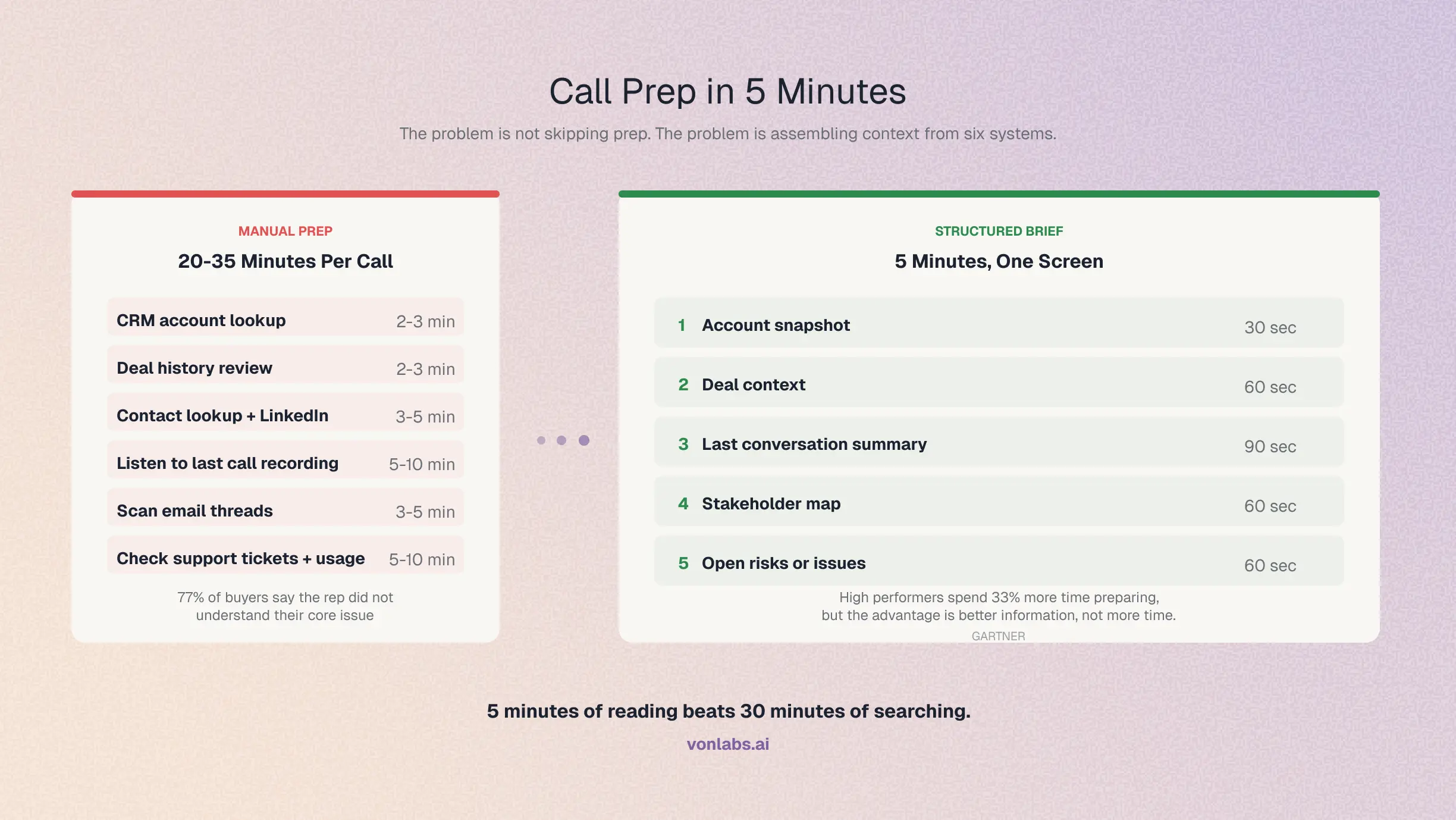
A well-prepared rep walks into a call knowing six things:
Total manual prep time: 20-35 minutes per call. A rep with 5 calls per day would need 2-3 hours of prep time. That is the entire 9% Salesforce measured, consumed by prep for a single day of calls.
Why Reps Skip Prep (Or Do It Badly)
Too many systems. The context lives in 5-6 different tools. Opening Salesforce, then the call recorder, then email, then LinkedIn, then the support platform takes longer than the prep itself.
Back-to-back scheduling. Reps run 4-6 calls per day with 15-minute gaps between them. There is no time for 30 minutes of research between calls.
Diminishing returns. After the first 5 minutes of prep, each additional minute yields less useful context. The account overview and last call summary cover 80% of what the rep needs. The remaining 20% (support tickets, product usage, email threads) takes 80% of the prep time.
The 5-Minute Call Prep Framework
Effective call prep is not about spending more time. It is about getting the right information in the right order:
1. Account snapshot (30 seconds). Company name, industry, ARR, account owner, contract dates. This is CRM data that should be available at a glance.
2. Deal context (60 seconds). Current stage, close date, deal value, forecast category, and how long the deal has been in the current stage. This tells the rep where the deal stands.
3. Last conversation summary (90 seconds). What was discussed on the last call or in the last email exchange. What commitments were made. What questions were left open. This is the most valuable piece of prep because it prevents the rep from asking the prospect to repeat themselves.
4. Stakeholder map (60 seconds). Who is involved in the deal, what their roles are, and who has been engaged recently. This tells the rep whether they are talking to the right person and whether the deal is multi-threaded.
5. Open risks or issues (60 seconds). Open support tickets, product adoption concerns, or competitive mentions from previous conversations. This prevents the rep from being blindsided on the call.
Gartner found that high-performing salespeople spend 33% more time preparing before calls than their lower-performing peers. But the advantage is not more time. It is better information. A rep who spends 5 minutes reviewing a structured brief outperforms a rep who spends 20 minutes clicking through tabs.
What Changes with an Intelligence Layer
The framework above works if someone assembles the brief. The question is who.
An intelligence layer like Von connects to your CRM, call recorder, email, and data warehouse and generates a structured call brief automatically before every meeting. The rep opens one screen and sees the account snapshot, deal context, last conversation summary, stakeholder map, and open risks. No tab-switching. No manual research. Five minutes of reading, not thirty minutes of searching.
For more on how CRM data quality affects call prep, see How to Keep Your CRM Clean Without Policing Reps.
Frequently Asked Questions
How long should a sales rep spend preparing for a call? Five minutes with the right information is more effective than thirty minutes of manual research. The goal is a structured brief that covers account context, deal status, last conversation, stakeholders, and open risks. If assembling that brief takes more than five minutes, the problem is the tooling, not the rep.
What should a sales rep research before a call? Six things: account overview (company, industry, ARR), deal context (stage, close date, value), last conversation summary (what was discussed, what was committed), stakeholder map (who is involved and their roles), open risks (support tickets, competitive mentions), and recent news or changes at the company.
How do you prepare for a call when you have back-to-back meetings? Use a pre-built call brief that assembles context from your CRM, call recorder, and email automatically. Read it in the 5 minutes before the call instead of spending 15-20 minutes clicking through multiple systems.
What is the most important thing to know before a sales call? What was discussed on the last call. Asking a prospect to repeat information they already shared is the fastest way to lose credibility. A summary of the last conversation, including commitments made and questions left open, is the single most valuable piece of call prep.
Can AI automate call preparation? Yes. An intelligence layer can connect to your CRM, call recorder, email, and data warehouse and generate a structured call brief before every meeting. This eliminates the manual research step and ensures every rep walks into every call with the same quality of preparation.
This is the eighth and final post in the RevOps Playbook series.
Previous: How to Keep Your CRM Clean Without Policing Reps
RevOps Playbook Series
- How to Run a Pipeline Review That Finds Real Risk
- How to Build a Sales Forecast That Leadership Trusts
- How to Build a QBR Deck in Minutes, Not Days
- How to Set Up Territory Planning Without a Dedicated Analyst
- How to Track Competitor Mentions Across Your Deal History
- How to Measure Rep Performance Beyond Quota Attainment
- How to Keep Your CRM Clean Without Policing Reps
- How to Prep for a Customer Call in 5 Minutes