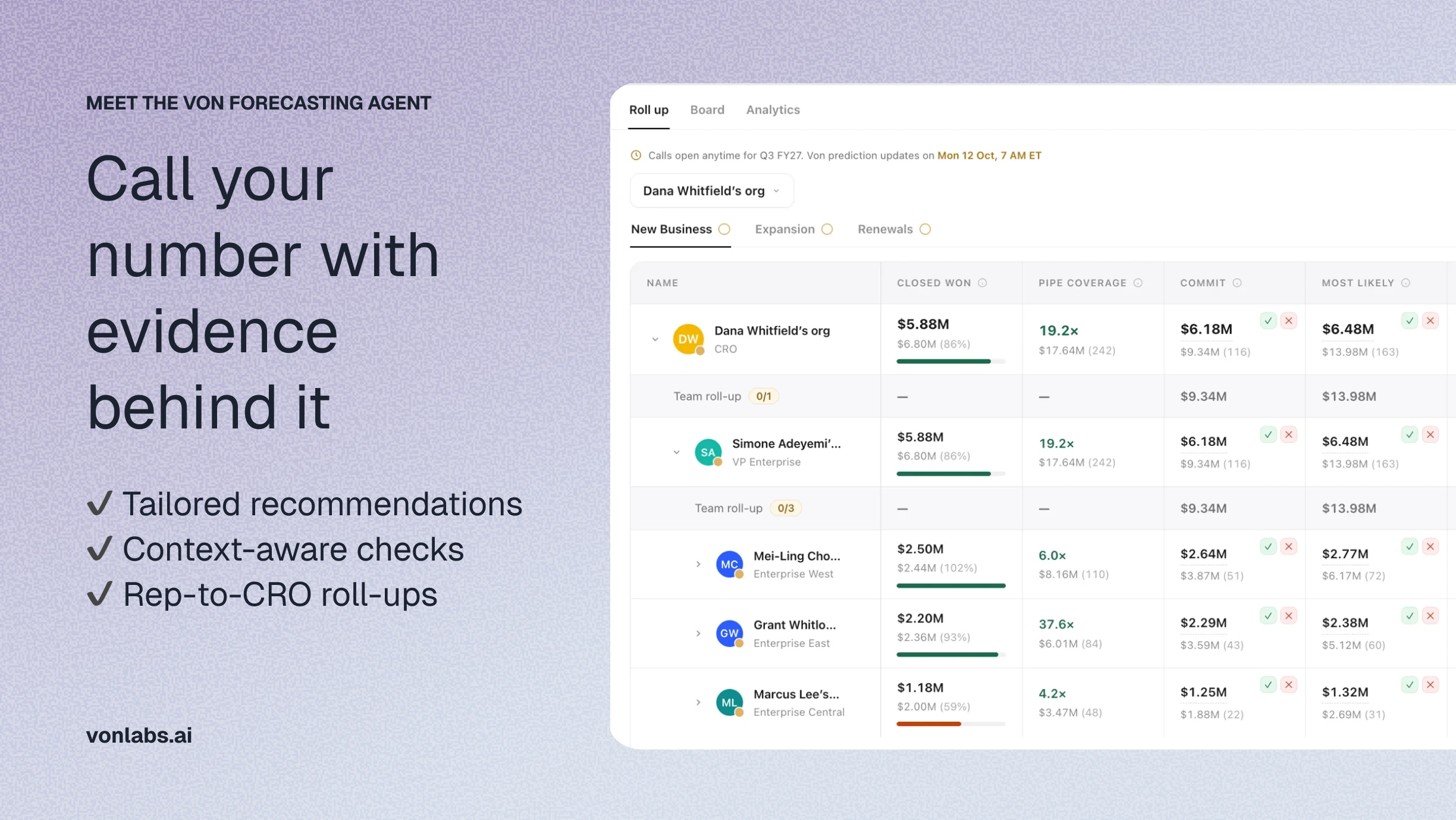
Forecast week usually runs on chasing. Reps update a sheet or a tool, managers chase missing numbers, and leaders spend the review asking why a number moved instead of deciding what to do about it. The Von Forecasting Agent takes on that work across the whole forecast, from recommending each number to gathering the reasoning behind it.
Key points:
- The Von Forecasting Agent is an AI sales forecasting agent that works through your weekly forecast, from the first recommended number to the final roll-up.
- It recommends each person's weekly forecast number using your team's definitions, Salesforce deal data, and signals from call notes and emails, then checks every submission and asks follow-up questions when a decision needs explaining.
- It checks every submission and asks follow-up questions when a number differs from what the deals show.
- Forecast calls roll up the reporting line from reps to the CRO, with each submission's notes and author preserved.
- It reads deals and metrics from Salesforce, writes back only the updates you approve, and stores every forecast call in Von.
What does the Von Forecasting Agent do, how does it recommend a number, and what happens when someone disagrees? This guide explains how it works for reps, sales leaders and RevOps, how it fits with the tools your team already uses, and how to get started.
What is the Von Forecasting Agent?
The Von Forecasting Agent is an AI sales forecasting agent that recommends forecast numbers, checks submissions, and helps managers inspect their team’s forecast calls. It uses your team’s definitions, Salesforce deal data, and signals from call notes and emails.
Reps submit the number they expect to close in categories such as Commit, Most Likely, and Best Case. Managers review their team’s submissions and make their own forecast call. This continues up the reporting line to the CRO.
Each person starts from Von’s recommendation and can accept it or submit a different number with an explanation. Von keeps the submission history, including notes and authors, so leaders can understand how the forecast changed.
What does the Von Forecasting Agent do?
The Von Forecasting Agent works through the whole weekly forecast, from the first recommendation to the final roll-up:
- It recommends a number for each person and forecast category before anyone types, and keeps it current until they submit.
- It sends each person their recommendation in Slack or email before the deadline, so they can agree or submit by replying.
- It checks each submission when it's saved and asks a follow-up question when something needs explaining.
- It writes a short forecasting note that sums up each conversation for the manager.
- It helps managers inspect their team's calls against the deals behind them and answers questions about any rep or deal in chat.
- It keeps every submission with its note and author, so you can see why a number changed and, over time, who called it right.
Von also prepares Salesforce updates alongside each recommended number, such as a new close date or stage. They're applied together with your submission when you agree, and nothing is written until you approve it.
What does a weekly forecast submission look like?
A rep reviews Von's recommended number on the board or in Slack or email, adjusts it if needed, adds a note, and saves. If something needs explaining, Von asks in a side chat before the number is confirmed. Step by step:
- Open your submission cell, or the recommendation Von sends you in Slack or email. Von's recommended number is there, along with the deals that fit the category today and any Salesforce updates it suggests.
- Take Von's number or type your own, add a short note, and save. From Slack or email, you can agree or submit by replying.
- If nothing needs explaining, the number saves, any Salesforce updates you agreed to are applied, and the board updates.
- If something does, the submission moves to a side chat. Von asks a question or two, and you answer in your own words.
- Von replies with your number and a note that sums up the conversation for your manager. You confirm, and the board updates.
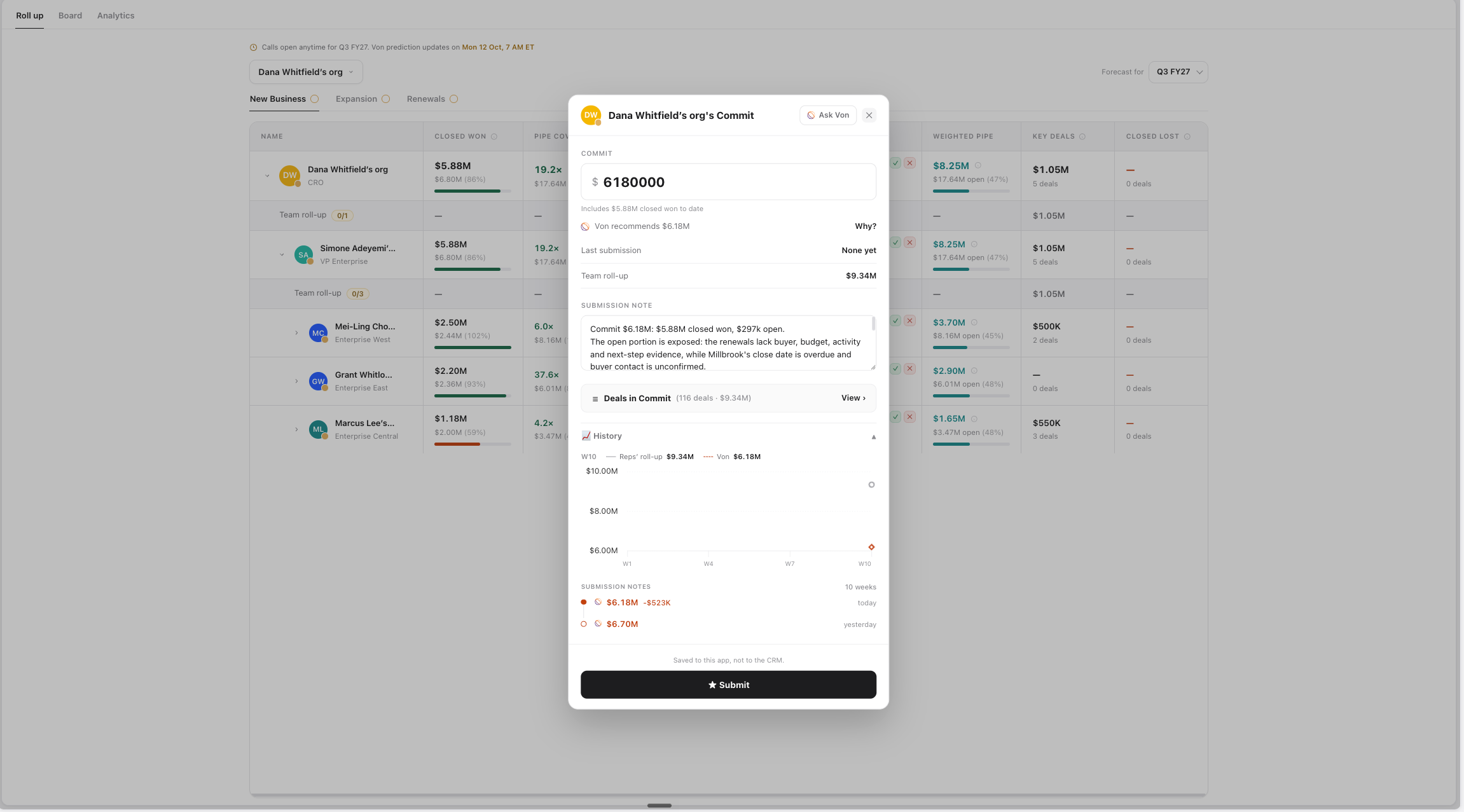
Each level of the reporting line has its own deadline, so managers see their team's numbers before their own are due. Before each deadline, Von reminds everyone who hasn't submitted and lets them submit by replying. At each deadline, Von saves a snapshot of the board for later analysis.
How does the Von Forecasting Agent recommend a forecast number?
The Von Forecasting Agent recommends a forecast number using your team's definitions, Salesforce deal data, and signals from call notes and emails. Your team describes, in plain language, which deals belong in each forecast category and how Von should weigh those signals. A Commit definition might read: Stage 3 or later, budget confirmed, verbal commitment from the buyer, and a close date inside the period. Because the recommendation follows the definitions your team writes, you decide how Von judges each category, and you can refine a definition later by asking Von in chat.
The check at submission uses the same inputs: the category definition, the deals in it, Von's own recommendation, and what has changed since the last snapshot.
Can reps and managers submit a different number than Von recommends?
Yes. Reps and managers can accept the recommendation or submit their own number with an explanation. The recommendation is a starting point, and the final call is theirs. If a number is far from Von's, a line in the note explaining why saves a round of follow-up later.
What do sales managers see in the Von Forecasting Agent?
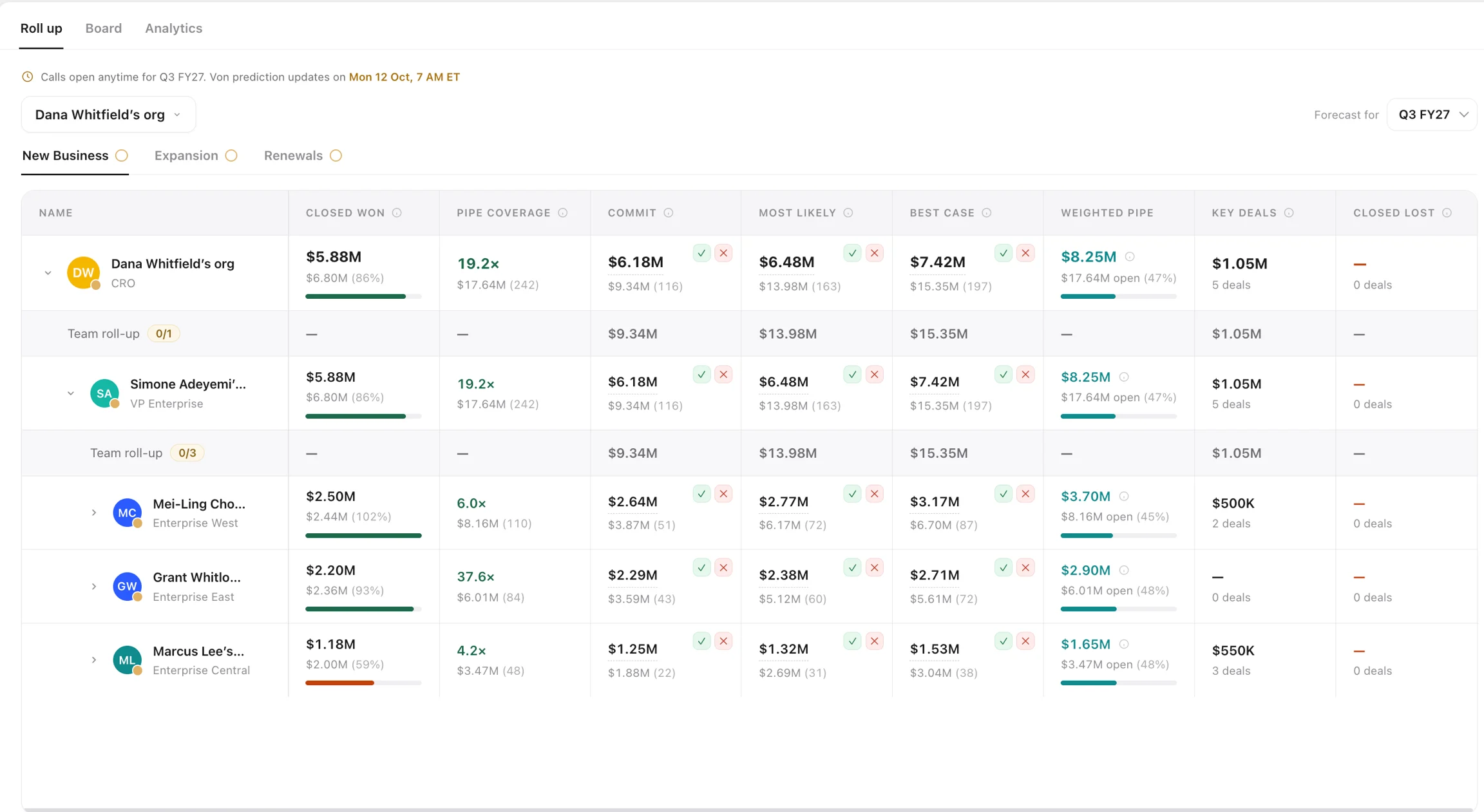
Sales managers see what each person on their team called, how many have submitted, and the deals behind the numbers. Each manager sees their own row and everyone under them, and the CRO sees the whole org. On the roll-up board, a band under each manager shows the team's calls and submission count. In each forecast column, the number a person called sits above the total of the deals that fit the category, so a call that doesn't match its deals stands out.
From there, managers can:
- Open any submission to read the note and see how the number changed over time.
- Click a metric such as Closed Won to see the deals behind it.
- Use the waterfall in Analytics to see what slipped, closed or came into the period since it started.
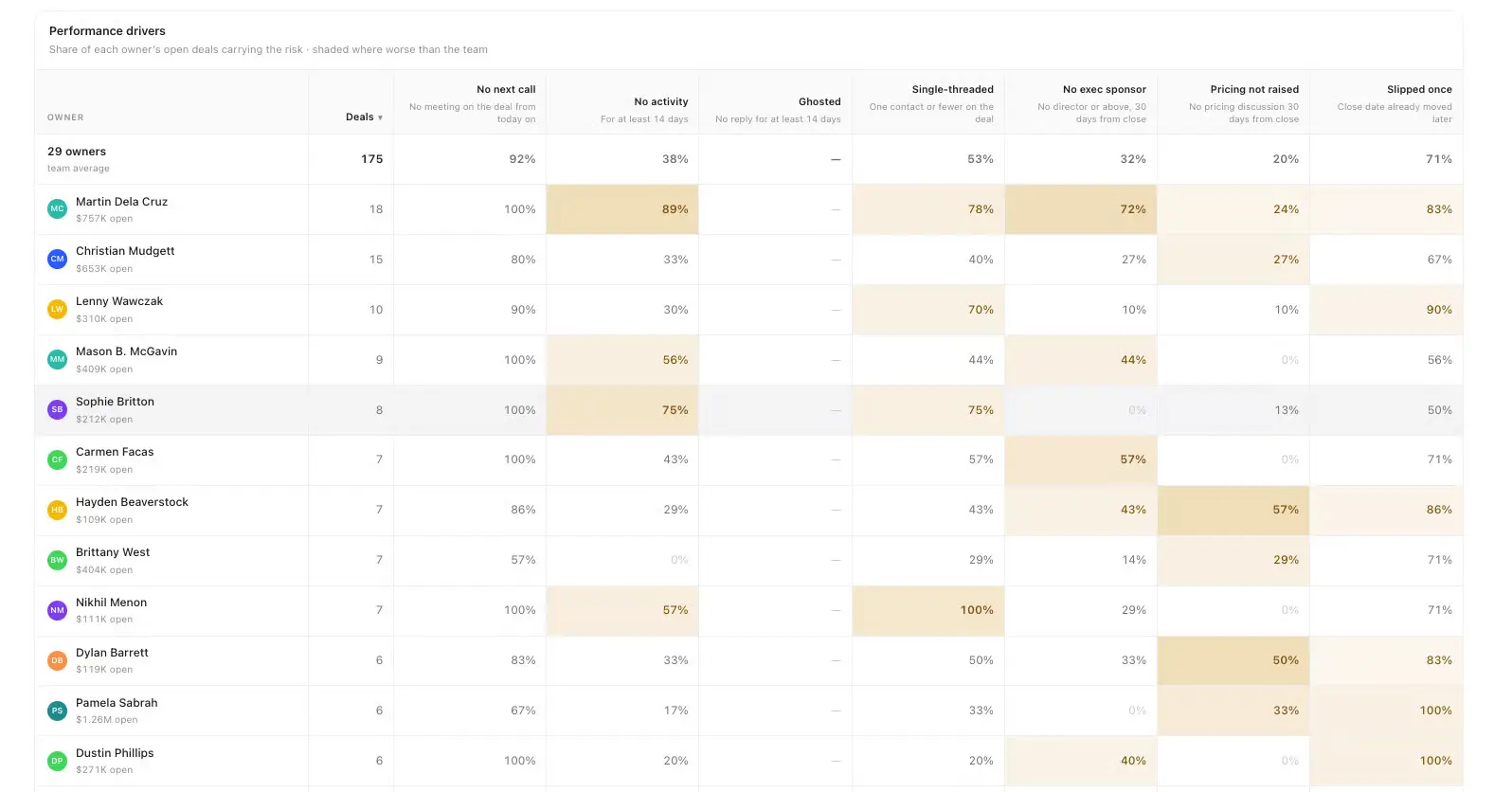
- Use performance drivers to see what share of deals carry the signals they coach to, such as a confirmed budget or a booked next step.
- Submit their own team number, or update a report's number when someone is out. The history records who made each change.
Can RevOps customize the Von Forecasting Agent?
Yes. RevOps configures boards, forecast categories, metrics, targets and deadlines by talking to Von in chat, with no settings screens to work through, and every change is logged. Teams can forecast separate motions, such as new business and renewals, each with its own period, categories and deal owner field.
Targets, the reporting hierarchy, and submission history are stored in Von. Teams can use that same forecast data in chat and dashboards, with access governed by their permissions. A leader can ask Von to show each rep's Commit for the last four quarters next to what they closed, and the answer uses the same numbers as the board.
How does the Von Forecasting Agent compare with Salesforce, Clari, Gong and spreadsheets?
Most sales forecasting software, including Salesforce, Clari and Gong, offers AI-assisted forecasting on CRM data. Clari and Gong also draw on signals from customer conversations and email. The Von Forecasting Agent works with the same kinds of data. What sets it apart is how it runs the weekly forecast: it recommends numbers from your team's own category definitions, gathers the reasoning behind each call when it's submitted, and keeps forecast data usable across the rest of your revenue work in Von.
Salesforce forecasting comes built into Sales Cloud, with AI predictions and customizable forecast categories. The Von Forecasting Agent keeps Salesforce as the source of truth for deals and metrics, so it adds to your CRM rather than replacing it. On top of that data, it adds recommendations based on how your team defines each category, follow-up questions at submission, and forecast history you can use in chat and dashboards.
Clari offers forecast roll-ups and AI projections built from call transcripts, email activity, CRM data and engagement signals, and it shows human projections next to AI projections. The Von Forecasting Agent also compares each person's call with its own recommendation. The difference is in how the reasoning is gathered: when a number needs explaining, Von asks in a side chat and turns the answer into a note for the manager.
Gong Forecast pairs CRM fields with signals from customer interactions to predict deal and revenue outcomes. The Von Forecasting Agent also reads call notes and emails, but you decide how those signals count by describing each category in plain language. You can change those definitions, deadlines and metrics later by asking Von in chat.
Spreadsheets are flexible and familiar, but someone has to refresh the pipeline, chase submissions and track every version. The Von Forecasting Agent reads deals from Salesforce, rolls numbers up the reporting line automatically, reminds each rep before the deadline, and keeps every submission with its note and author.
Teams that forecast in Outreach will recognize the automated roll-ups and submission history. The Von Forecasting Agent adds category definitions in your team's own words and conversational checks when numbers are submitted.
Can we switch from Gong or Clari to the Von Forecasting Agent?
Yes. Teams moving from Gong or Clari can import their targets, reporting lines, and submission history, so the first forecasting dashboard opens with real numbers. The Von team helps set up the import. If you use another forecasting tool, talk to the team about what can be brought over.
How do we get started with the Von Forecasting Agent?
Talk to the Von team, who will help you connect your reporting line, targets and forecast categories so your first board opens with real numbers.